
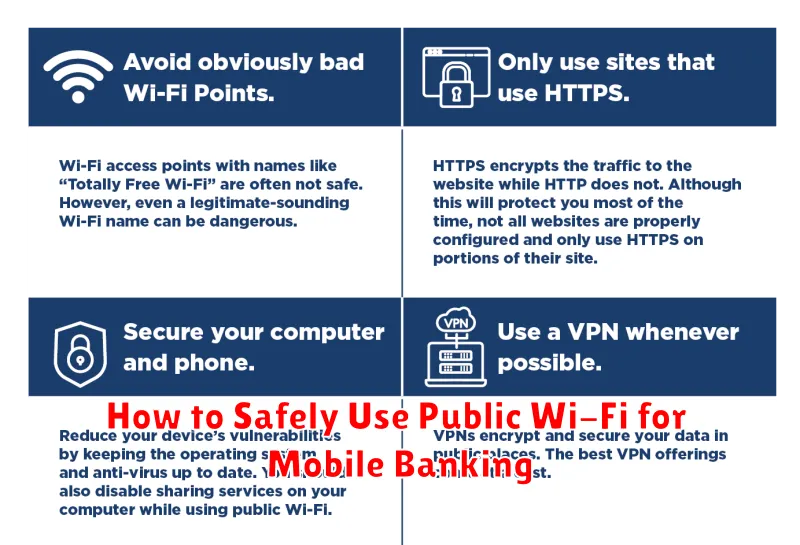
In today’s interconnected world, accessing your bank account via mobile banking on public Wi-Fi is incredibly convenient. However, it’s crucial to understand the security risks involved. Public Wi-Fi networks, often found in cafes, airports, and hotels, typically lack robust security measures, making them vulnerable to cyberattacks. This can expose your sensitive financial information, including usernames, passwords, and transaction details, to malicious actors. Therefore, learning how to safely use public Wi-Fi for mobile banking is paramount to protecting your financial well-being. This article will provide essential tips and best practices to ensure your mobile banking activities remain secure even on unsecured networks.
Using public Wi-Fi for mobile banking can be risky, but with the right precautions, you can significantly mitigate these risks. By understanding the potential dangers and implementing the strategies outlined in this article, you can confidently manage your finances on the go without compromising your security. We’ll explore important concepts such as using a VPN, verifying website security certificates, enabling two-factor authentication, and avoiding sensitive transactions on public networks. Follow these guidelines to establish secure mobile banking practices and keep your financial information safe from prying eyes while using public Wi-Fi.
Risks of Using Public Wi-Fi for Banking
Using public Wi-Fi for banking can expose you to several security risks.
Man-in-the-middle attacks are a significant concern. Attackers can intercept data transmitted between your device and the banking server, gaining access to your login credentials and financial information.
Unsecured networks lack encryption, meaning your data is transmitted in plain text, easily readable by anyone with the right tools. Malware can also be spread through public Wi-Fi, potentially infecting your device and stealing sensitive information.
Rogue Wi-Fi hotspots mimicking legitimate ones can trick you into connecting and handing over your data to malicious actors.
How Hackers Exploit Open Networks
Unsecured public Wi-Fi networks are prime targets for hackers. Without strong encryption, data transmitted between your device and the network is visible to anyone with the right tools.
Common exploitation techniques include man-in-the-middle attacks, where hackers intercept data passing through the network. They can capture login credentials, credit card information, and other sensitive details. Packet sniffing is another tactic, allowing hackers to analyze network traffic for valuable information.
Hackers can also set up rogue access points, mimicking legitimate Wi-Fi networks to lure unsuspecting users. Once connected, victims unknowingly transmit their data directly to the hacker.
Use of VPNs and Secure Connections
When accessing mobile banking on public Wi-Fi, using a Virtual Private Network (VPN) is highly recommended. A VPN creates an encrypted connection between your device and the VPN server, shielding your data from potential eavesdroppers. This added layer of security helps prevent unauthorized access to sensitive information like login credentials and transaction details.
Ensure your device also utilizes HTTPS. Look for the padlock icon in the address bar to confirm a secure connection to the banking website. This indicates that communication between your device and the website is encrypted.
Avoid Entering Sensitive Info in Public
Public Wi-Fi networks often lack robust security measures. Avoid accessing or entering sensitive personal information, such as bank account details, credit card numbers, or Social Security numbers, while connected to public Wi-Fi. This information could be intercepted by malicious actors.
Consider postponing sensitive transactions until you are on a secure, private network. If you absolutely must access sensitive information, use a virtual private network (VPN) to encrypt your connection and protect your data.
Only Use Official Bank Apps
When accessing your bank account on public Wi-Fi, always use the official bank app provided by your financial institution. Avoid using third-party apps or accessing your account through a mobile web browser.
Official bank apps are developed with enhanced security measures to protect your financial information. These apps often incorporate multi-factor authentication and data encryption, which are crucial for safe mobile banking on public networks.
Log Out and Clear Data After Sessions
Logging out of your mobile banking app after each session is crucial. Don’t simply close the app; ensure you select the “log out” option. This terminates your authenticated session and prevents unauthorized access should your device be compromised.
Furthermore, consider clearing your browsing data, including cache and cookies, related to your banking activity. This extra step removes any lingering traces of your session that could potentially be exploited.
Alternatives: Use Mobile Data When Possible
The safest alternative to public Wi-Fi for mobile banking is your mobile data connection. Cellular data is generally more secure than public Wi-Fi because it’s encrypted and access is controlled by your mobile carrier.
While mobile data might incur costs, prioritize security when accessing sensitive financial information. Consider mobile data usage as an investment in protecting your finances. If your data plan is limited, use it strategically for crucial transactions like money transfers or bill payments.
