
In today’s interconnected world, protecting your banking data is paramount. Phishing attacks are a constant threat, employing deceptive tactics to steal sensitive information such as usernames, passwords, and credit card details. These attacks can lead to significant financial losses, identity theft, and damage to your credit score. Understanding how to recognize and avoid these threats is crucial for maintaining your financial security. This article provides essential guidance on how to safeguard your banking data from the pervasive threat of phishing attacks, empowering you with the knowledge and tools to stay safe online.
We will explore the various forms that phishing attacks can take, ranging from deceptive emails and text messages to fraudulent websites and phone calls. We’ll delve into the tell-tale signs of a phishing attempt, such as suspicious links, requests for personal information, and grammatical errors. By learning to identify these red flags, you can effectively protect your banking data and avoid falling victim to these scams. This knowledge is your first line of defense in the ongoing battle against cybercrime and is essential for anyone conducting financial transactions online.
What Is a Phishing Attack?
A phishing attack is a type of cyberattack where fraudsters impersonate legitimate entities, often via email, text message, or website, to trick individuals into revealing sensitive information.
This information commonly includes usernames, passwords, credit card details, and social security numbers. The goal of a phishing attack is to gain unauthorized access to accounts or systems for financial gain or identity theft.
Phishing attacks often employ social engineering tactics, manipulating victims through deceptive messages that create a sense of urgency or fear.
How to Spot Suspicious Emails and Links
Phishing attacks often employ deceptive emails and links. Be wary of emails with unknown senders or those that seem too good to be true. Generic greetings, misspellings, and grammar errors are red flags.
Examine links carefully. Hover your mouse over them (without clicking) to see the actual URL. Discrepancies between the displayed text and the underlying URL are a strong indicator of a phishing attempt. Look for misspelled domain names or unusual characters.
Steps If You Click a Phishing Link
Clicking a phishing link can expose your device and data to cybercriminals. Act swiftly if you suspect you’ve clicked one.
Disconnect from the internet. This helps prevent further data exfiltration or malware installation.
Scan your system with a reputable antivirus and anti-malware program. A full system scan will help identify and remove any malicious software.
Change all your passwords, especially for your banking and other sensitive accounts. Choose strong, unique passwords.
Contact your bank immediately. Report the incident and follow their guidance. They can monitor your account for suspicious activity.
Verifying Sender Identity
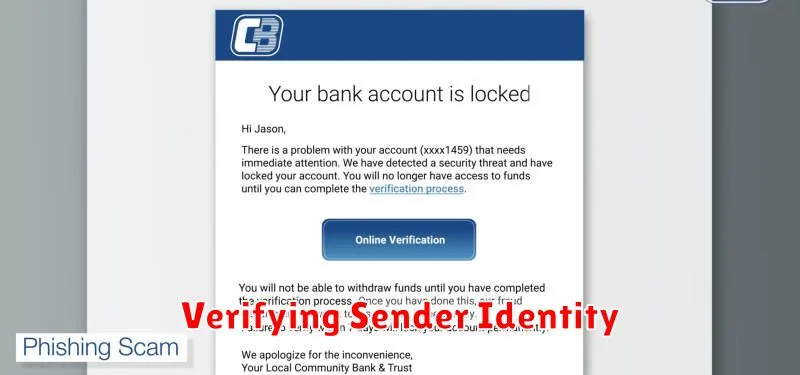
One of the most critical steps in defending against phishing attacks is verifying the sender’s identity. Phishers often disguise themselves as legitimate entities. Don’t rely solely on the display name.
Carefully examine the email address. Look for misspellings or unusual characters in the domain name. If anything seems suspicious, proceed with caution.
If you are unsure, contact the organization directly through a known phone number or website. Never use contact information provided in a suspicious email.
Using Browser and Email Filters
Browser filters and email filters are essential tools for protecting your banking data. These security features actively scan incoming data for suspicious links and content commonly associated with phishing attempts.
Most modern browsers have built-in phishing and malware protection. Ensure this feature is enabled in your browser’s settings. Similarly, activate spam filters within your email client. These filters often categorize suspicious emails, preventing them from reaching your inbox and significantly reducing your risk of encountering a phishing attack.
Reporting Phishing Attempts
Reporting phishing attempts is crucial in the fight against online fraud. By reporting these attempts, you help protect yourself and others from becoming victims.
If you suspect you’ve encountered a phishing attempt targeting your banking information, immediately contact your bank. Provide them with as much detail as possible, including the date, time, and method of contact (e.g., email, text message). If possible, preserve the original phishing message.
You should also report the incident to the appropriate authorities. This may include your local law enforcement or a dedicated cybersecurity agency in your country.
Recovering Compromised Accounts
Discovering your bank account has been compromised can be distressing. Act swiftly. Contact your bank immediately to report the suspicious activity. They will likely freeze your account to prevent further unauthorized transactions.
Change your online banking password to a strong, unique one. Review your recent transactions for any unauthorized charges and report them to your bank. You may need to file a police report and contact credit reporting agencies to monitor your credit for fraudulent activity.
